
移动端
跨平台技术的由来
动态化内容需求增大。当需求发生变化时,纯原生应用需要通过版本升级来更新内容,但应用上架、审核是需要周期的,这个周期对高速变化的互联网时代来说是很难接受的,所以,对应用动态化 ( 不发版也可以更新应用内容) 的需求就变得迫在眉睫了。
业务需求变化快,开发成本变大。由于原生开发一般都要维护 Android、iOS 两个开发团队,版本迭代时,无论人力成本还是测试成本都会变大。
跨平台技术简介
这里的跨平台主要是指移动端跨平台(ios,android),根据原理,主要可分为如下三类。
- H5(HTML5)+ 原生 ( cordova、ionic capacitor)。
- javascript 开发 + 原生渲染 ( React Native)。
- 自绘 UI+原生 ( QT Mobile、 Flutter、Kotlin Multiplatform)。
capacitor
初始化
shell
# 初始化
# Create a new Capacitor app
npm init @capacitor/app

# Or add Capacitor to your web app
# A package.json file
# A separate directory for built web assets such as dist or www
# An index.html file at the root of your web assets directory

npm i @capacitor/core
npm i -D @capacitor/cli
npx cap init


# 安装平台

npm install @capacitor/android # @capacitor/ios

npx cap add android
npx cap sync
npx cap open android

# 运行
# Running on the Command-Line
npx cap run android
# Running with Android Studiocapacitor关闭android橡皮筋(android rubber band)效果
java
public class MainActivity extends BridgeActivity {


    @Override
    public void onCreate(Bundle savedInstanceState) {
        super.onCreate(savedInstanceState);
    }

    @Override
    public void onStart() {
        super.onStart();
        WebView webview = getBridge().getWebView();
        webview.setOverScrollMode(WebView.OVER_SCROLL_NEVER);
    }
}android调试
- wifi连接 手机开启usb调试、开启无线调试
shell
adb pair ip:port-for-pair
adb connect ip:port-for-connect
- usb连接
手机开启usb调试模式,使用数据线连接电脑,点击电脑上的adb图标,点击Connect to device,选择设备即可。 - avd连接
打开项目后,从主菜单栏中依次选择 View > Tool Windows > Device Manager,然后点击 +,再点击 Create Virtual Device 使用木木模拟器adb connnet localhost:16384
移动端模板
https://github.com/easy-temps/vue3-vant-mobile.git
应用内测分发
v2ex客户端vue实现版
手绘风格设计稿
- 主页

- 设置页

android布局检查器
https://github.com/Grigory-Rylov/android-layout-inspector
android后台服务支持的库
https://github.com/koush/AndroidAsync
根据图生成代码
flutter
LINUX环境下安装
# develop Flutter on Linux
sudo apt install -y curl git unzip xz-utils zip libglu1-mesa

# 开发linux app
sudo apt install clang cmake git ninja-build pkg-config libgtk-3-dev liblzma-dev libstdc++-13-dev

# 验证环境
flutter doctor -v!> libstdc++-12-dev还是libstdc++-13-dev这个包需要根据clang -v的结果而定,我这里需要安装libstdc++-13-dev,否则运行flutter run -d linux启动出错 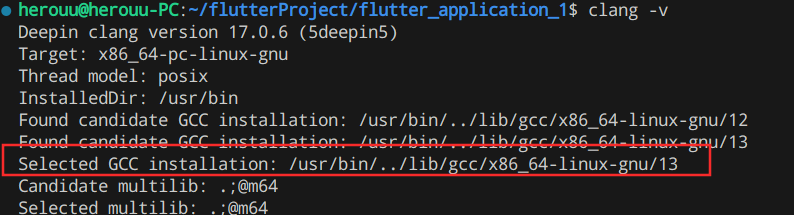
无xcode环境如何打包flutter ios应用
- 使用codemagic 个人评估免费 !>codemagic打包ios ipk,需要签名的证书(没有xcode环境,搞不定,开发个ios app真tm贵),且需要在项目中使用shorebird
!>Make sure you have run "flutter build apk" at least once.这个需要安装android开发环境
- shorebird init